

Chart Trading Education: Order Lines
What Is an Order Line?
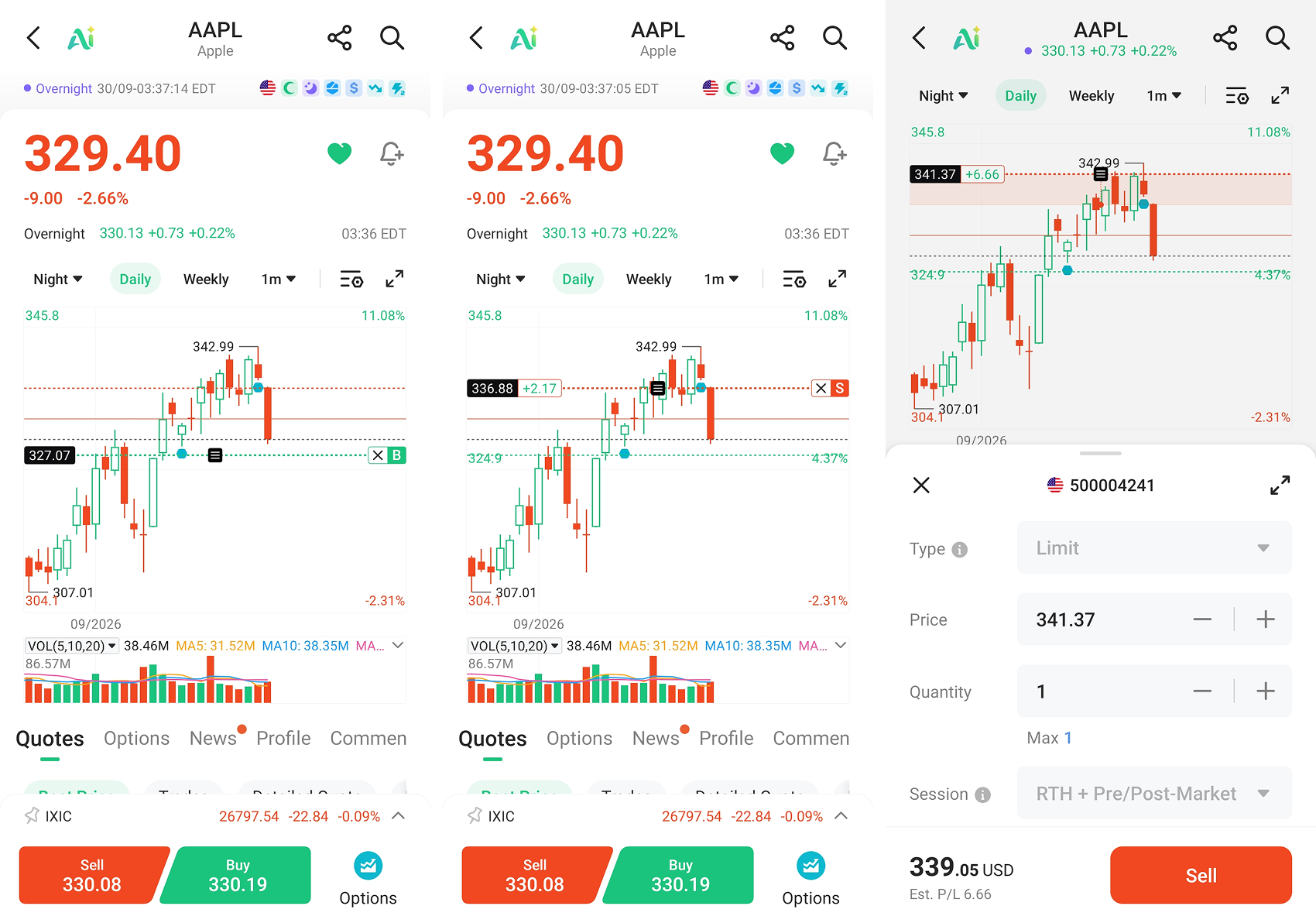
An order line is a horizontal line drawn on the chart at the price of one of your working orders. It lets you see at a glance how far your order sits from the current price, without leaving the chart for the order list.
Each line shows two things: the price and the side (buy or sell).
If the order closes a position, the line also shows an estimated realized profit or loss — roughly how much you'd gain or lose if that order fills. Orders that add to your position don't show this, because they don't lock anything in; they just make your position bigger.
There are also two actions on the line: modify and cancel. To modify, drag the line or tap the price flag on the left. To cancel, tap the cancel button.
Which orders get a line
They do:
- Limit orders — orders placed at a price you specify
- Iceberg orders — orders placed at a price you specify
- Stop orders that haven't triggered yet
- Bracket orders that haven't triggered yet — a pair of orders that sets both a take-profit and a stop-loss
They don't:
- Market orders — they fill immediately, so there's no fixed price
- Pegging orders — the price is pegged to another instrument, so it isn't fixed
- Trailing stop orders — the stop price keeps moving, so it isn't fixed
In short: no fixed price means no line to draw.
What price does the line sit at
| Order type | Price the line uses |
| Limit | Limit price |
| Iceberg | Limit price |
| Stop (untriggered) | Stop price |
| Bracket (untriggered) | Take-profit stop price, and separately the stop-loss stop price |
A bracket order gets two lines rather than one, because it's really two sets of orders: one for taking profit and one for stopping loss, each at its own price.
Why you only see two lines at most
The chart draws at most two order lines, plus your position line.
If you have more than two working orders, the chart shows only the nearest one above the current price and the nearest one below. The reason is simple: whichever way price moves, those are the two it hits first — nothing else is in reach yet.
This is designed to keep the chart from turning into a mess. If ten orders meant ten lines, you'd never be able to read the price.
Your other orders are still working. They're just not drawn, so there's no need to worry that they've disappeared.
Modifying and cancelling
To change just the price: drag the line to a new price and release. That's the fastest way.
To change the quantity or order type: tap the price flag. This opens the order panel with the order loaded, so you can adjust it there.
To cancel: tap cancel on the line, then confirm.
Some states don't allow a change or a cancellation — for example, an order that's partially filled, meaning only part of it has been filled and the rest hasn't yet. When that's the case, a message on screen tells you.
If you can't see the lines
Check two things first:
1. Whether the in-flight orders switch in chart settings has been turned off
2. Whether the funding account selected on your account page is the one holding those orders
An example
You long a stock trading at 100, with four orders working:
- Limit sell at 108
- Limit sell at 112
- Limit buy at 94
- Stop at 90
The chart draws two lines: the sell at 108 and the buy at 94, since those are the nearest ones above and below the current price.
The sell at 108 also shows an estimated realized profit or loss, because it closes part of your long — it locks something in. The buy at 94 doesn't, because it adds to your position.
If price reaches 108 and that order fills, its line disappears and the sell at 112 moves up to become the nearest line above, and gets drawn instead.
Figures labelled as estimates are estimates. Actual results depend on execution price and fees. Nothing above is a recommendation to trade.