

Chart Trading Education: Position Lines
What Is a Position line?
A position line is a horizontal line drawn on the chart at the cost price of your holding. The gap between it and the current price is your unrealized profit or loss:
- Price above the line → you're up
- Price below the line → you're down
The line shows your cost price and your unrealized profit or loss, which moves with the price in real time.
There are also two actions on the line:
- Close: exit the position outright
- Attach take-profit and stop-loss: add protective orders to the position
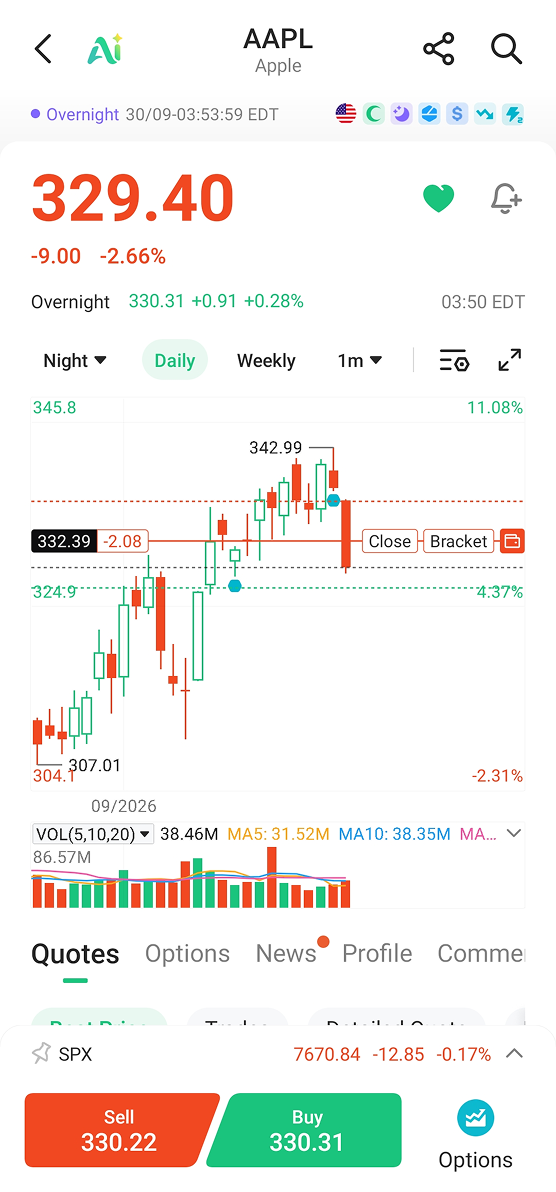
Cost price: with or without fees
Cost price can be calculated in two ways: with fees or without fees.
The position line follows whatever your position list is set to, and labels which one you're seeing.
The figure including fees is your real break-even — the price at which you come out flat.
In a small position with fixed charges, the two can sit visibly apart. So it's worth knowing which one you're reading.
How to use it
- To exit: tap close
- To add protection: tap take-profit and stop-loss, and the corresponding order lines will appear on the chart once they're working
If you can't see the line
As with order lines, check two things first:
1. Whether the positions switch in chart settings has been turned off
2. Whether the funding account selected on your account page is the one holding that position
Figures labelled as estimates are estimates. Actual results depend on execution price and fees. Nothing above is a recommendation to trade.